


Logo
Logo
Logo
Logo
Contact Us
Customer Grievance
Logo
Home
About Us
  • Bank Vision

  • History of Bank

  • Speech of Chairman

  • Annual Reports

  • Membership Details

  • Awards Received by Bank

  • HIGHLIGHTS

  • Progressive Overview

About Us
Deposits
  • Savings Account

  • Interest Rates

  • Term Deposit

  • Recurring Account

About Us
Loans
  • Emergency Loan

  • Medium Term Loan

  • Higher Education Loan

  • Other Loan

  • Housing Loan

  • Mortgage Loan

  • Vehicle Loan

  • Loan Related Information

About Us
Services
  • Lockers

  • ATM

  • RTGS/NEFT

  • Missed Call Alert

  • Monthly Statement

  • MCB Mobile Banking

  • MCB Mobile Policy

About Us
Management
  • Board of Directors

  • Executive's Profile

About Us
Customer Care
  • Management Contact

  • Branch locator

  • Bank's ATMs locations

  • Customer Grievance policy

  • Customer Online Grievance

  • Notices for customers

About Us
Careers
More
  • Tender Invitation

  • Bank Charges

  • Whistle Blower Policy

  • Download Documents

  • Unclaimed Deposits

  • Special Moments of Bank

  • Dividend Slip
  • Policy for Appointment of Auditor

About Us
Contact Us Customer Grievance
Banking in Your Pocket

Mobile Banking

Home / Mobile Banking
Download App

Mobile Banking

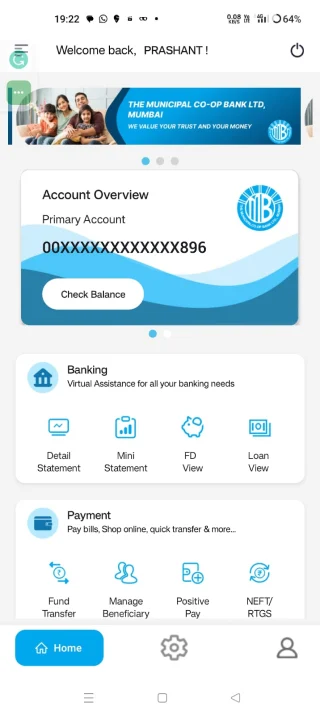
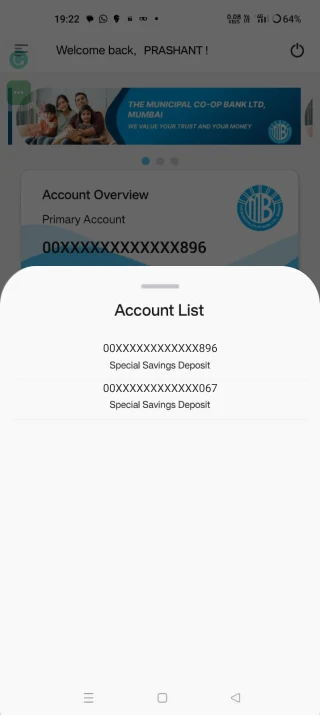
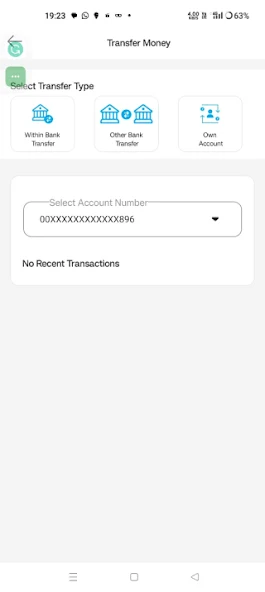
The Municipal Co-Op. Bank Ltd., Mumbai brings you Mobile Banking service through which you get instant enquiry of customer accounts (Deposit/Loan), Funds transfer through NEFT, IMPS Value added services like Cheque requisition and IMPS (Immediate Payment Service by NPCI). This service enables you to transfer money from one account to another account in our bank as well as one bank to another bank instantly. IMPS service is available 24 X 7 and 365 days a year with no holidays.

You can send money to a beneficiary account from anywhere in India from your mobile phone. The money can be withdrawn by the beneficiary from his/her bank account or any ATM. Once the transaction gets completed, the remitter and beneficiary will get an SMS confirmation of the transaction immediately.

Features of Mobile Banking

Daily Transaction Limit: ₹50,000/-
Enquiry
  • Balance Enquiry
  • FD balance Enquiry
  • Last 5 Transaction Enquiry
  • Loan balance Enquiry
  • Funds transfer Limit Enquiry
Funds Transfer & IMPS
  • NEFT: 8:00 AM to 06:30 PM using A/c No. and IFSC
  • IMPS (24x7): P2P (Person to Person using Mobile No.)
  • IMPS P2A: (Person to Account using SB account No)
  • IMPS P2M: (Person to Merchant)
Services & Miscellaneous
  • Cheque Book Requisition
  • Stop Cheque
  • Revoke Cheque
  • Change PIN / App Password
  • Add / View / Delete Beneficiary

Advantages of Mobile Banking

  • Greater Customer convenience
  • Available on Holidays
  • Reduce Turnaround Times and Cost Savings
  • Extensive Application security
  • User friendly simple interface
  • Mobile banking having an edge over internet banking
  • Available across the banks

Pre-requisite for IMPS

  • Register yourself for mobile banking services with using your WAP/GPRS enabled handset.
  • Download software for mobile banking as per the guidance from the Bank.
  • Register yourself and get MPIN.
  • Beneficiary has to link his mobile number to his account and must have MMID number from his respective bank to receive funds.
  • Daily Transaction Limit for Mobile Banking is Rs. 50,000/- .

How to get Money?

  1. Link your mobile number to The Municipal Co-op. Bank Ltd., Mumbai account to get your 7 digits mobile money identifier (MMID) from bank.
  2. Share your mobile number and MMID with the remitter.
  3. Ask the remitter to send money using your mobile number and MMID.
  4. Check the confirmation SMS for credit to your account from the remitter.

How to send Money?

  1. Register yourself for mobile banking with The Municipal Co-op. Bank ltd., Mumbai.
  2. Get your 7 digit Mobile Money Identifier (MMID) from Bank.
  3. Enable and activate your mobile banking service of your bank on your handset by downloading The Municipal Bank Mobile Application from play store, register yourself into it and get Mobile Banking PIN (MPIN)
  4. Get beneficiary mobile number and his/her MMID.
  5. Send money to the beneficiary following the menu option in the mobile application.
  6. Check the confirmation SMS for debit to your account and credit to beneficiary account.
Download & Registration

For using Municipal Bank Mobile Banking, your handset should be GPRS enabled. Simply download the Municipal Bank Mobile Banking Application from Google Play Store:
https://play.google.com/store/apps/details?id=com.lcode.mcb
Get yourself registered and set your MPIN for further transactions.

IMPS Member Banks

Major Banks in India are members of Interbank Mobile Payment Service.

Important Note for Incomplete Transactions
  • If in case of incomplete financial transactions through Mobile Banking, Bank will reverse the funds into Customers account on next working day.
  • If not reversed, Customer has to submit a complaint letter to branch. Then Bank will raise chargeback to the merchant’s bank and reversal or receipt of chargeback slip at Bank’s end may take 5 working days.
  • The procedure is as per Immediate Mobile Payment System / National Payments Corporation of India rules.
  • Customers should quote branch / account no. / registered mobile number in the complaints if any.
Bank Logo

022-22717800 | mcbank@mcb.bank.in

Municipal Bank Bhavan, 245, P'Dmello Road,
Fort, Mumbai – 400 001

Download the MCB Mobile app today

GET IT ON
Google Play
GET IT ON
App Store
DICGC Logo DICGC QR

The Municipal Co-operative Bank Ltd., Mumbai is registered with DICGC.

About Bank

  • History & Legacy
  • Our Vision
  • Our Mission
  • Bank Performance
  • What's New
  • Board of Directors

Our Services

  • Savings Accounts
  • Term Deposits
  • Interest Rates
  • Recurring Deposits
  • Loan Schemes
  • UPI Payments

Help & Information

  • Contact Us
  • Branch Locator
  • ATM Locator
  • Careers
  • Online Grievance
  • Grievance Policy

Newsletter

Please enter your e-mail and subscribe to our newsletter.

© 2026 The Municipal Co-Op Bank Ltd. All rights reserved.

Web platform powered by Cleuz